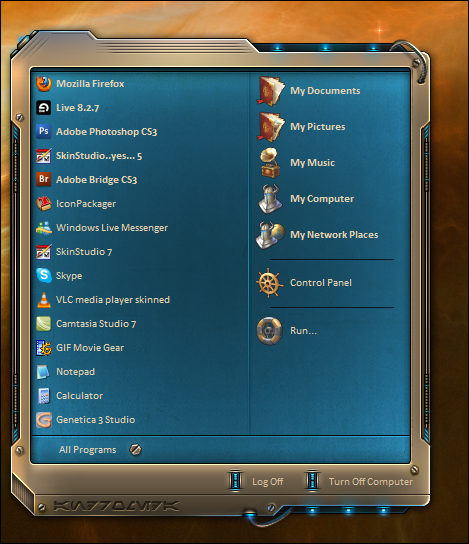
Dreamed this up last night, more to follow....
..lots more...
Subject to change*
So, how much will change between now and release?
Release? I just got started..
I'm really looking forward to this one, v.
Will we be able to recolor the blue main section?
as well as WB can I suppose, The rule of thumb with recoloring is the flatter the color, the least amount of gradients... the better.
Thanks Po
I generally don't recolor blinds because it's not always easy to recolor the peripheral skins.
Plus recoloring would alter what drew me to the skin in the first place.
That's just me. I usually use all skins in their default state, to get the effect the author envisioned.
Thanks V. I'll give it a proper look later, but it seems like you work like I do. If it weren't for putting things in groups, I'd be totally screwed, 'cause I can't be bothered with naming layers.
If I don't name the layers I get totally lost. I use modules in my smx's now and keeping them straight in my head is one thing but remembering them all and in what order .... no way. Looking forward to this baby.
Layers? What the heck are "layers"?
See next reply...lol.
That's what the old folks called their laying hens. The ones that produced eggs.
Heh... once in a while, i may name, or group some layers, I think maybe i did a couple on this project, but, for the most part, I find naming, grouping, takes more time than I spend finding the layers by memory.... I'm not naming 250+ layers so, to that end, that's my illogical logic (See Fuzzeh)
Here's my method... and.. this may or may not help folks..
1. If i want to access a layer.. I..... click on it ! , yes, I know its profound, but that's my science.
2. If a layer I want, is under another layer.. I just click on the upper layer, then travel down thru the layers palette until I find it.
3. I typically.. just remember, after working on something, where layers are, in the layers palette. sort of memorization thru attrition.
4. Photoshop does not install this at default but ALWAYS ALWAYS make sure that when u have the move tool (black arrow) selected, that in the options bar above you have 'Show bounding box" \ "show transform controls" checked (depending on ur PS version) Secondly make sure you have " Auto select" checked as well.
without these being checked... I'd be lost too.
Just a couple of tips from an old and weary skinner.
Off to bed... thanks folks.
don't tell me you've been doing all that blind work and not known that..... oh... there should be a li'l book of helpful hints like this... this one's a huge sense of humour saver....